WhatsApp makes it easier to get the best out of Meta AI
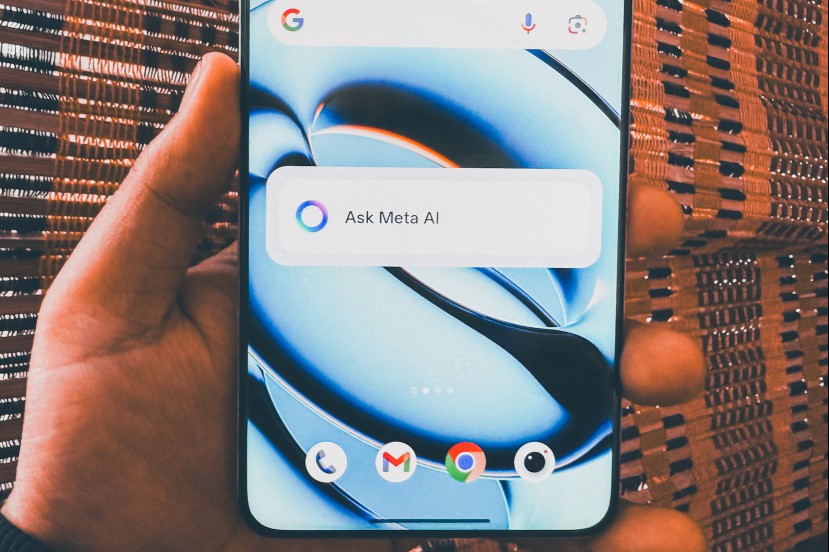
Meta has found another place to push its eponymous AI, after injecting it as a standalone chat character in the world’s most popular messaging app. The latest public beta build of WhatsApp now allows users to create a dedicated widget for Meta AI.
You can either go with a condensed view, or an expanded view where you see three different types of controls. The feature is rolling out with build number v2.25.6.14 of the app via Google Play Store.
In the basic format, the widget looks like a clean bar with “Ask Meta AI” written over the text field. Tapping on it takes you directly to the WhatsApp chat window with the AI chatbot.

In the expanded view, you can either go with 1×3 grid layout, or a bigger boxy format where all three controls are labeled for better identification. The expanded view offers a higher degree of functional convenience, just the way Google’s Gemini AI has been implemented as a shortcut on the iPhone’s Lock Screen.
The first one, with the circular Meta AI icon, launches the text chat in WhatsApp. The second button with a camera icon is for uploading photos, while the third option is for starting a voice chat, somewhat like the voice mode in ChatGPT or the Gemini Live interface.
The overarching theme here is ease of access, saving users the hassle of launching the WhatsApp application, scrolling through their chat list, and then picking up the appropriate mode to start a conversation with Meta AI.
As far as capabilities go, it can hold a conversation like any other voice-based AI chatbot out there. You can also ask it to generate images, or have it summarize documents. I asked it to break down a research paper by providing the URL, and Meta AI did a decent job at it.
Aside from chatting with Meta AI directly, users can also forward messages and even summon it in group chats by using the @ shortcut. It is worth pointing out that Meta might use details of your interactions with the AI, but won’t have access to other chats as they remain end-to-end encrypted.
Recent Articles